Founding customers: start a pilot by 2 November 2026 and keep Growth at €319 a month for your first year. Founding price €319/mo · until 2 Nov See the offer
NEW 1.2Team queues, REQ / INC numbering and smarter alertsTeam queues and smarter alerts

Every client. Every request. One workspace.

A support desk, a client portal, profit per client and a sales pipeline in one app, with Lumos AI pointing to what needs you next. For agencies, IT and software teams, professional services and any business that looks after clients.

30-DAY PILOT ON YOUR OWN DATA · YOUR OWN ISOLATED INSTANCE · OUR CLOUD OR YOUR SERVER

See it in
Lumos Now Command view: tickets past target, clients at risk, escalations and today's schedule
Lumos Now Command view on a phone
SUPPORT DESK·CLIENT PORTAL·EMAIL TO TICKET·TEAM QUEUES·SERVICE TARGETS·CLIENT PROFIT·SALES PIPELINE·LUMOS AI
Who it’s for

If you look after clients, it fits the way you work.

Wherever clients send requests, report problems and pay for an ongoing service, the same pieces apply: a desk, a portal, a pipeline and a clear view of what each client earns you. You name your own services and queues.

Don’t see your industry? If clients email you and you deliver a service, it fits. Tell us about your business

One login · one bill

Stop paying for four tools that don’t talk to each other.

Tickets live in one app, time in another, margins in a spreadsheet and prospects in a CRM. Lumos Now connects them, so the ticket you answer today shows up in the client’s profitability tonight.

Helpdesk with targets and a client portal$55 / person
AI assistant for the support team$29 / person
Time, margin and profit per client$25 / person
Sales pipelineextra

Freshdesk Pro, Freddy AI Copilot and Productive Professional, at their published US list prices in October 2026.

10
Separate tools≈ €948 / mo
Lumos Now Growth€399 / mo
You keep, every year
€6,588
and get a sales pipeline on top.
Show prices in
Product tour

Built around how client-facing teams actually work.

Eight connected spaces, shown with sample data. Pick one to look inside.

Command

Start every day knowing what matters.

One screen shows what needs attention now: tickets past their target, clients at risk, escalations and proposals waiting for a decision, plus your day in focus.

    Command view
    Playing through each space · click a tab to stop Screenshots in
    Try it · email to ticket

    Send a client email and watch where it lands.

    This is how Lumos Now handles every email to your support address: it numbers it, files it in the queue that owns that service, and alerts the right people. Pick your kind of business and a scenario, then press send.

    What is the client writing about?
    Is something broken?

    Sample client: Harbor & Pine Hotels. Queues as a team like yours might set them up.

    1 · Email arrives
    From Sofia Reyes, Harbor & Pine Hotels → support@yourcompany.com
    Online booking page returns a 500 error
    2 · Ticket created
    INC-1213Incident
    Matched to Harbor & Pine Hotels by the sender’s address
    3 · Filed in a queue
    Web & Hosting
    Takes website, hosting and automation work
    4 · People alerted
    In the app and by email. The owner hears about every queue.
    5 · The email your team receives
    [Urgent] New ticket in your queue Web & Hosting: INC-1213 · Harbor & Pine Hotels
    From Your Company Support <support@yourcompany.com>
    There’s a new ticket in your queue Web & Hosting.
    Ticket
    INC-1213 (incident)
    Client
    Harbor & Pine Hotels
    Subject
    Online booking page returns a 500 error
    Priority
    P1 · High
    Queue
    Web & Hosting
    Lumos AI

    It finds the signal.
    You make the call.

    Every morning Lumos AI reads your tickets, clients and pipeline, then proposes the next move: reclassify, reassign, remind, monitor or follow up. Each proposal says why. Nothing changes until someone accepts it.

    On scheduleEvery morning in your time zone, or when you ask
    LearnsFrom the reasons you reject a proposal
    PrivateClient names stay anonymised
    Support · suggested today 07:30High confidence

    Reclassify REQ-1202 as an incident

    “Class reminder notifications arrive late” describes something that stopped working, not a change request.

    Support · suggested today 07:30High confidence

    Assign REQ-1210 to Daniel

    Unassigned for two days. Daniel looks after this client’s website.

    Pipeline · suggested today 07:30Medium confidence

    Follow up with 3 prospects due today

    Sample proposals. Try Accept or Reject on the first one.

    Client portal

    Your clients will actually like opening tickets.

    A clean portal where clients report incidents, ask for changes, follow progress in plain language and rate the result. Invite their whole team: portal users are unlimited on every plan.
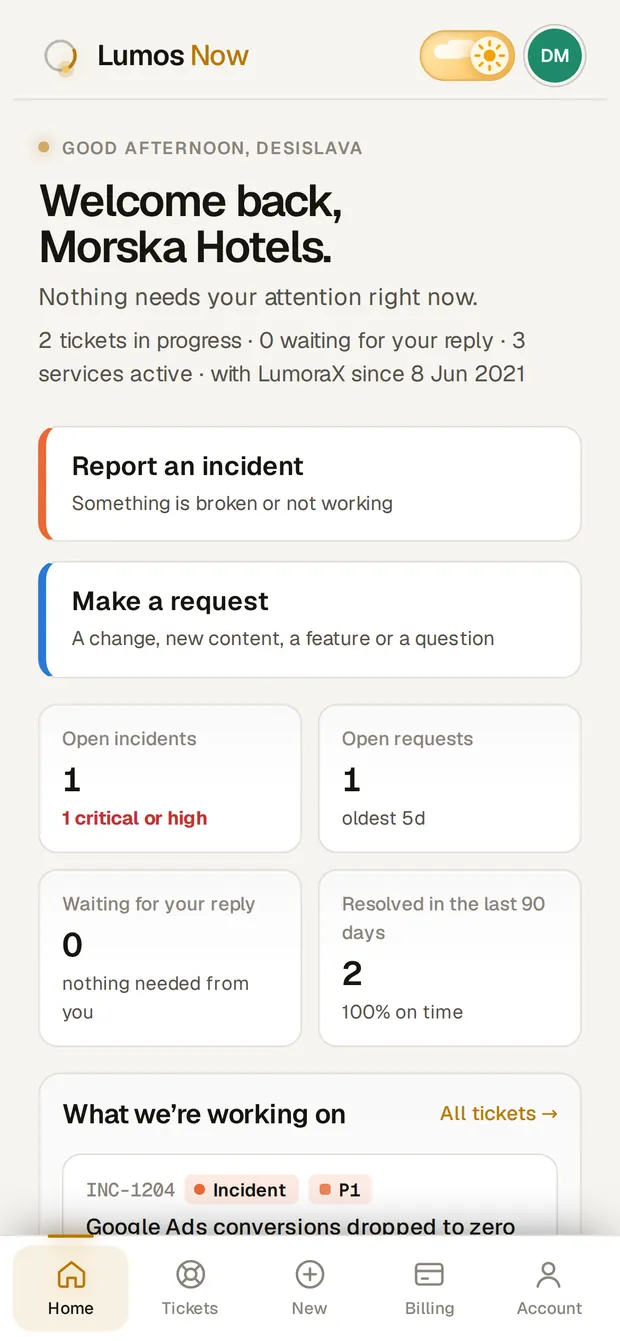
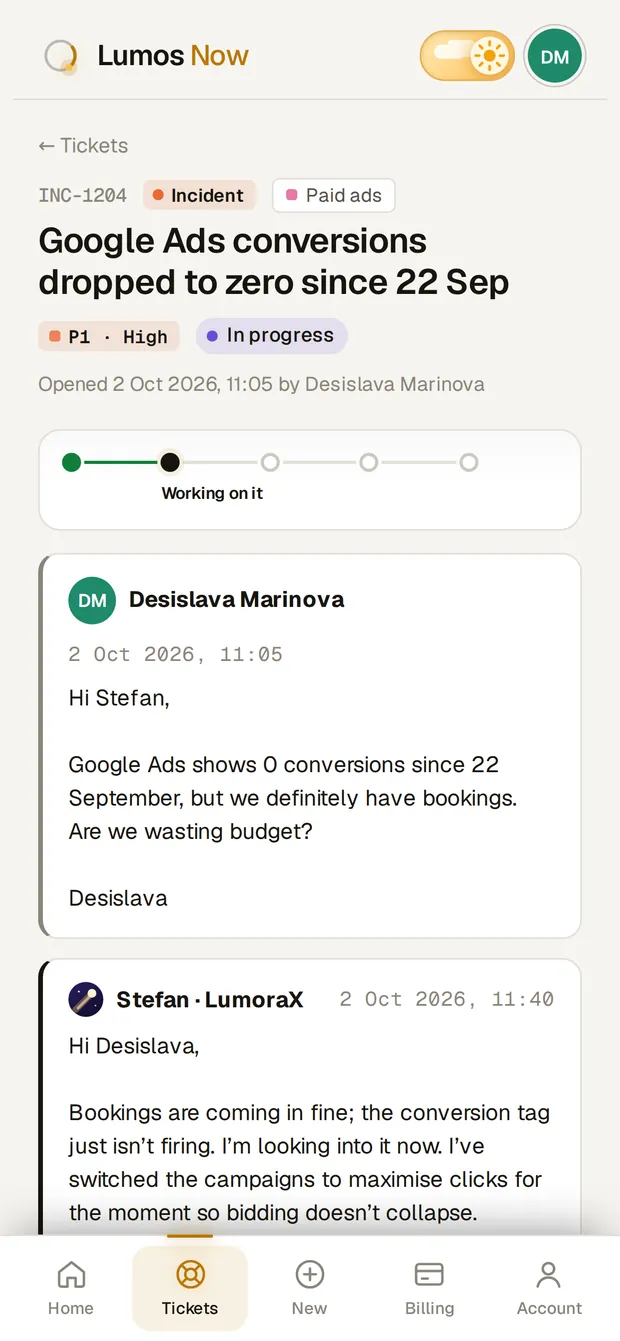
    Status they understandReceived, in progress, waiting for you, solved, with the history in one place.
    Made for phonesThe whole app works on a phone, for your team and for your clients.
    Only their companyClients see their own tickets and nothing else, never your internal notes.
    Client portal home on a phone
    A client following an incident on a phone
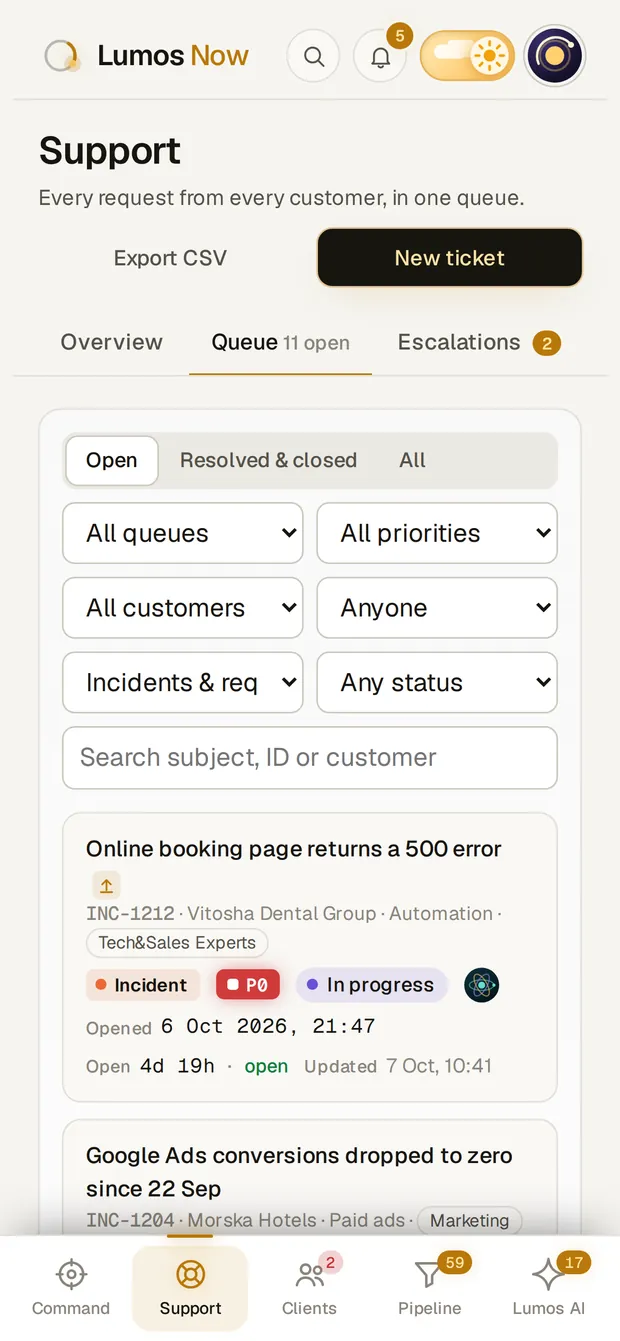
    The support queue on a phone
    The details

    Small things your team will notice on day one.

    ⌘K

    Find anything in a keystroke

    Search tickets, clients, prospects and people from anywhere in the app.

    • Harbor & Pine Hotelsclient
    • Landing page for the autumn offerREQ-1211
    INC-1213 has been assigned to younow
    Update on REQ-1200 · client replied4m
    New request in Marketing1h

    Alerts you control

    Assigned to you, new in your queue, updates on your tickets. Each person picks what reaches their inbox, and clears the rest in a click.

    A ticket in the light themeThe same ticket in the dark theme

    Light by day, dark by night

    Both themes are designed with the same care, on desktop and phone.

    A face for everyone

    Pick a photo, your initials or one of 21 original avatars. The owner also gets a six-piece Founder collection nobody else can use.

    Your data in and out

    Import prospects from a spreadsheet. Export tickets, clients and prospects as CSV whenever you need them.

    Security & ownership

    Your data, your instance, your rules.

    Your own instance

    Every customer runs on a separate app and database. Nothing is shared with another company.

    Our servers or yours

    We run it for you, or the Dedicated plan installs on your own server with a single script.

    Two-step sign-in

    Authenticator codes with backup codes. The owner can make it required for everyone.

    Access per person

    Finance, pipeline, AI, portals and team switch on or off per person, with every change logged.

    Nightly backups

    Database, files and settings every night, kept for 14 days, encrypted if you choose.

    Leave any time

    A full export of your data when you go, then deletion. Your data stays yours.

    Pricing

    One price for the team, not per seat.

    Unlimited client portal users on every plan. No surprise bills when your client’s team grows.

    Currency

    Starter
    For small client-facing teams
    €149/month
    Billed monthly
    Start with Starter
    • Up to 5 team members
    • Support desk, queues and email to ticket
    • Client portal, unlimited users
    • Client finance and profitability
    • Lumos AI built-in rules
    • Support on business days (CET)
    • One-off setup €500
    MOST POPULAR
    Growth
    For growing teams with support and sales
    €399/month
    Billed monthly · founding price €319
    Book a demo
    • Up to 15 team members, then €25 each
    • Everything in Starter
    • Sales pipeline and campaigns
    • Full Lumos AI engine
    • Custom domain for your portal
    • Priority support
    • One-off setup €1,500
    Dedicated
    For larger teams and strict security
    from€1,200/month
    Agreed per contract
    Talk to us
    • Team size agreed per contract
    • Everything in Growth
    • On your servers or ours
    • Lumos AI with your choice of engine
    • Named contact, P0 around the clock
    • Project-managed rollout
    • One-off setup €5,000–€10,000
    Try it for 30 days on your own data.

    A €750 pilot with your mailbox, clients and services set up, run remotely wherever you are. Start by 2 November 2026, sign after the pilot, and keep Growth at €319 a month for your first year.

    Start a pilot
    Questions

    What teams ask before they switch.

    Is Lumos Now only for agencies?

    No. It fits any business that serves clients on an ongoing basis: agencies, IT and managed service providers, software companies, accounting, legal and consulting firms, property and facility managers, installers and field service teams, training providers and B2B suppliers. You name your own services and queues, so it uses your words, not ours.

    Do you work with companies outside Europe?

    Yes. Lumos Now runs in the browser, so your team and your clients can be anywhere. Schedules and the daily summary follow your company’s time zone, and the pilot and onboarding run remotely over video calls. The app is in English today.

    What do we need to get started?

    A support mailbox, such as support@yourcompany.com, and a list of your clients and services. We set up your instance, connect the mailbox and import your data. Starter teams go live in about two weeks, Growth teams in about four.

    Do our clients need paid seats?

    No. Client portal users are unlimited on every plan. You only pay for your own team.
    Can we keep supporting clients by email?

    Yes. Every email to your support address becomes a ticket, and replies go out from the same address in the same thread. Clients don’t have to change anything.

    Can different teams have their own queue?

    Yes. Create a queue for each team, choose its members and the services it takes. Members get an email for every new ticket in their queue and can filter Support to “My queues”.

    Does Lumos AI see our clients’ names?

    No. Names are replaced before anything is analysed, and every proposal waits for a person on your team to accept it.

    Where is our data stored?

    On your own isolated instance that we run for you, or on your own server with the Dedicated plan. It is backed up every night.

    What happens if we leave?

    You get a full export of your data for 30 days after the contract ends. Then it is deleted.

    See your own clients in Lumos Now within 30 days.

    Tell us a little about your team. We’ll show you the app on realistic data and plan your pilot together.

    Or write tosupport@lumos-now-internal.tech
    Your message, ready to sendTo: support@lumos-now-internal.tech
    Open in email app